Why your AI chatbot still doesn’t know who your customers should talk to—and the simple standard that fixes it.
By Dickey Singh, Cast.app
You’ve deployed an AI agent. It is fantastic at deflecting FAQs and handling simple support issues. But eventually, the moment of truth arrives. A high-value customer asks a nuanced question the bot can’t answer, or simply says, "I want to speak to my Customer Success Manager (CSM)."
What happens next?
Usually, the agent hits a wall. It apologizes and offers a generic "contact support" email. The trust built during the chat evaporates, and the customer feels stranded.
The problem isn’t that your AI agent isn’t smart enough. The problem is that it is isolated. It doesn't know who owns the account. It cannot answer the single most important question in a handover scenario:
"Who should the agent route the customer to when it can’t answer a question or they ask to speak with a CSM?"
To fix this, your AI needs a way to ask that question safely. Enter the Model Context Protocol (MCP) server.
Don't let the technical acronym scare you. For CX leaders, Model Context Protocol (MCP) is simply a standard way for AI agents to safely ask questions of your other business systems.
Think of an MCP Server as a specialized micro-service that exists to serve your AI agent. It has a very strict job description:
Is an MCP Server just an API?
If you already integrate systems, you might wonder, “Isn’t this just another API?” Not quite. An API is a generic door into an application — any developer can walk through it and do almost anything the app allows. An MCP server is a purpose-built, AI-facing contract: it exposes only a small, well-defined set of actions (like “get team member profile”), describes exactly what inputs it accepts and outputs it returns, and wraps that in a standard format AI models understand. In other words, APIs are for apps; MCP servers are curated, safety-scoped “tools” designed specifically for AI agents to use reliably and safely.
(Note: MCP is just one part of the puzzle. It handles data access. For a deep dive on how agents talk to each other (A2A) and handle complex human handoffs (A2H), check out our analysis of the 5 Key Open Agent Protocols.)
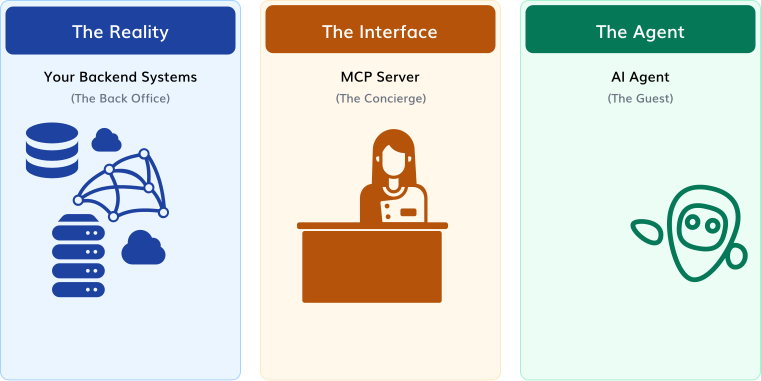
Imagine your AI Agent is a guest at a large hotel. The guest doesn't know where the extra towels are kept, or which chef is cooking tonight. If the guest wanders into the back office looking for answers, they will cause chaos.
Instead, the guest goes to the Concierge Desk. The guest asks, "Can I get extra towels?" The concierge handles the messy details of the back-of-house operations and simply delivers the towels to the guest.
In this analogy, your AI Agent is the guest. The MCP Server is the Concierge. It provides a clean, safe interface to a messy reality.
Most technical examples of MCP servers involve querying complex databases or writing code. Forget those for now.
In CX, the highest-value, lowest-risk starting point is solving the routing problem. Your first MCP server should do one thing perfectly: Answer the Anchor Question.
It needs to take a customer identity and return the profile of the human owner. It is a read-only, safe service that immediately turns a "dead end" into a warm introduction.
As a CX leader, you don’t need to know how to code Python to design this server. You need to define the business logic. You are designing the "contract" between the AI and your business rules.
You define the capabilities by strictly focusing on that anchor question:
"Who should the agent route the customer to when it can’t answer a question?"
This is where CX strategy meets technical execution. You must define what the server needs to know, and what it is allowed to say back.
The Input (What the AI provides):
Typically just an Account ID or Customer Email.
The Output (What the MCP returns):
Only approved business contact information. Name, Title, Professional Email, and perhaps a booking link and a headshot URL. Never sensitive HR data or internal notes.
The Guardrails (Your Business Rules):
The MCP server doesn’t just fetch data; it enforces your strategy.
To make this real, here is exactly what happens technically when an agent encounters a routing scenario. It’s less like a conversation between robots, and more like the agent selecting the right app from a menu.
1. Connect to the MCP Server First, the AI client establishes a secure connection to your specific MCP server (the "cx-concierge").
import { Client } from '@modelcontextprotocol/sdk/client/index.js';
import { StdioClientTransport } from '@modelcontextprotocol/sdk/client/stdio.js';
async function main() {
// Connect to the CX Concierge MCP server
const transport = new StdioClientTransport({
command: 'node',
args: [mcp_servers/cx_concierge.js'], // your MCP server build output
});
const client = new Client(transport);
await client.connect(); // runs MCP initialize under the hood
2. Request the "Menu" (List Tools) Before any chats begin, your AI agent asks the server: "What can you do?" The server responds with a list of capabilities.
//Request tools/list
const toolsResponse = awaitclient.listTools();
The agent now sees this "menu" of available tools:
{
  "tools": [
    {
"name": "get_escalation_contact",
"title": "Find escalation contact for an account",
"description": "Given an account identifier, return the primary human contact to route the customer to when the agent cannot answer a question or they ask to speak with a CSM.",
"inputSchema": {
"type": "object",
"properties": {
"account_id": {
"type": "string",
"description": "Internal account identifier"
}
},
"required": ["account_id"]
},
"outputSchema": {
"type": "object",
"properties": {
"fullName": {
"type": "string",
"description": "Full name of the escalation contact"
},
"jobTitle": {
"type": "string",
"description": "Role of the contact (e.g., CSM, AE)"
},
"email": {
"type": "string",
"format": "email",
"description": "Business email address"
},
"phoneNumber": {
"type": "string",
"description": "Business phone number"
},
"bookingUrl": {
"type": "string",
"format": "uri",
"description": "Link to book time with the contact"
},
"headshotUrl": {
"type": "string",
"format": "uri",
"description": "CDN URL for the contact’s headshot"
}
},
"required": ["fullName", "jobTitle", "email"]
},
"annotations": {
"category": "routing",
"audience": ["assistant"],
"sensitivity": "low",
"examples": [
"Use this tool when the user asks to speak with a human or a CSM.",
"Use this tool when you need to show the primary account contact in a briefing."
]
}
},
{
"name": "get_account_team",
"title": "Get Account Team",
"description": "Return all key roles (CSM, AE, Onboarding) for the account.",
"inputSchema": {
"...": "..."
}
},
{
"name": "get_account_health",
"title": "Get Customer Health",
"description": "Check if the customer is 'Healthy', 'At Risk', or 'Churned'.",
"inputSchema": {
"...": "..."
}
}
]
}
3. The Agent recognizes a need and "calls" a tool When a customer asks, "I want to speak to my rep," the agent realizes it can’t answer based on general knowledge. It looks at the menu above and selects the best tool for the job: get_escalation_contact.
// tools/call
const result = await client.callTool('get_escalation_contact', {
account_id: '12345',
});
console.log('Tool result:', result);
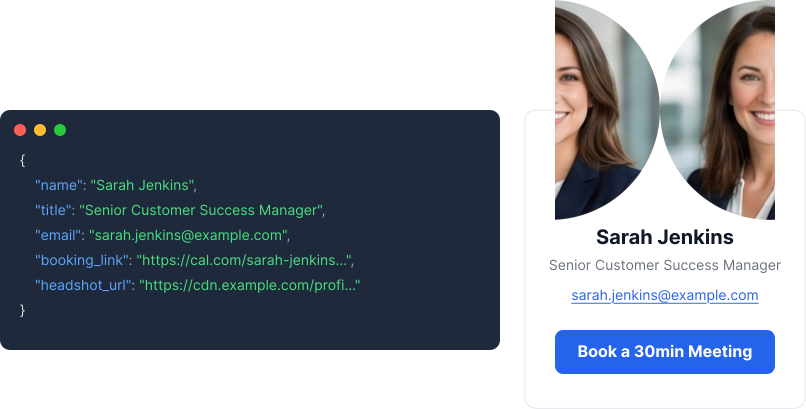
4. The MCP Server does the heavy lifting The server receives that command. It checks your guardrails (e.g., "Is this a VVIP customer?"), searches your messy backend systems, finds the right person, and returns a clean, structured "card" to the agent.
{
"name": "Sarah Jenkins",
"title": "Senior Customer Success Manager",
"email": "sarah.jenkins@example.com",
"booking_link": "https://cal.com/sarah-jenkins/30min",
"headshot_url": "https://cdn.example.com/profiles/sarahj.jpg"
}
5. The AI Agent generates the final response The agent takes that structured data card and translates it back into a natural, helpful response for the customer:
"I’d be happy to connect you. Your dedicated Success Manager is Sarah Jenkins. You can use this link to book time directly on her calendar:"
This all sounds great in theory. But as a CX leader, you know the messy reality:
Traditionally, answering that simple anchor question—"Who should the agent route the customer to?"—requires an engineer to build a custom integration that connects to all these legacy APIs, handles authentication, and maintains uptime. That is a heavy lift, which is why most teams are stuck with "dead end" bots.
You shouldn't have to build custom engineering projects just to tell your AI who your employees are. The goal is to separate the strategy (which you own) from the connectivity (which should be automated).
This is why we built the Cast MCP Proxy.
Instead of asking your developers to write code for Salesforce or Zendesk, the MCP Proxy acts as a universal translator. It wraps around your existing legacy systems and exposes them as clean, standardized MCP servers that any modern AI agent can understand.
BTW: This isn't just a quick fix. By using a proxy, you are actually adopting a strategic architectural pattern known as the Model Context Protocol Proxy Bridge (MPB). This ensures you don't have to rebuild integrations every time you change AI vendors. Read more about why MPB is the secret to future-proofing your stack here.
Your first MCP server isn't just about slightly better chat responses. It is the foundation for trusting AI with your most valuable asset: your customer relationships.
Your first MCP server is the foundation for trusted human handoffs. Learn how Cast handles all the complexity with AI agents for your customers, your teams, and your partners.